
Film budget software
Know Where the Money Stands Before Wrap
Budget a production by account, log purchase orders and actual costs as they happen, and read a cost report that shows what is committed, what is spent, the estimated final cost and the variance on every line. The budget sits in the same project as the schedule and the call sheets, on iPhone, iPad, Mac, Android and the web.


The budget
Start From a Real Chart of Accounts
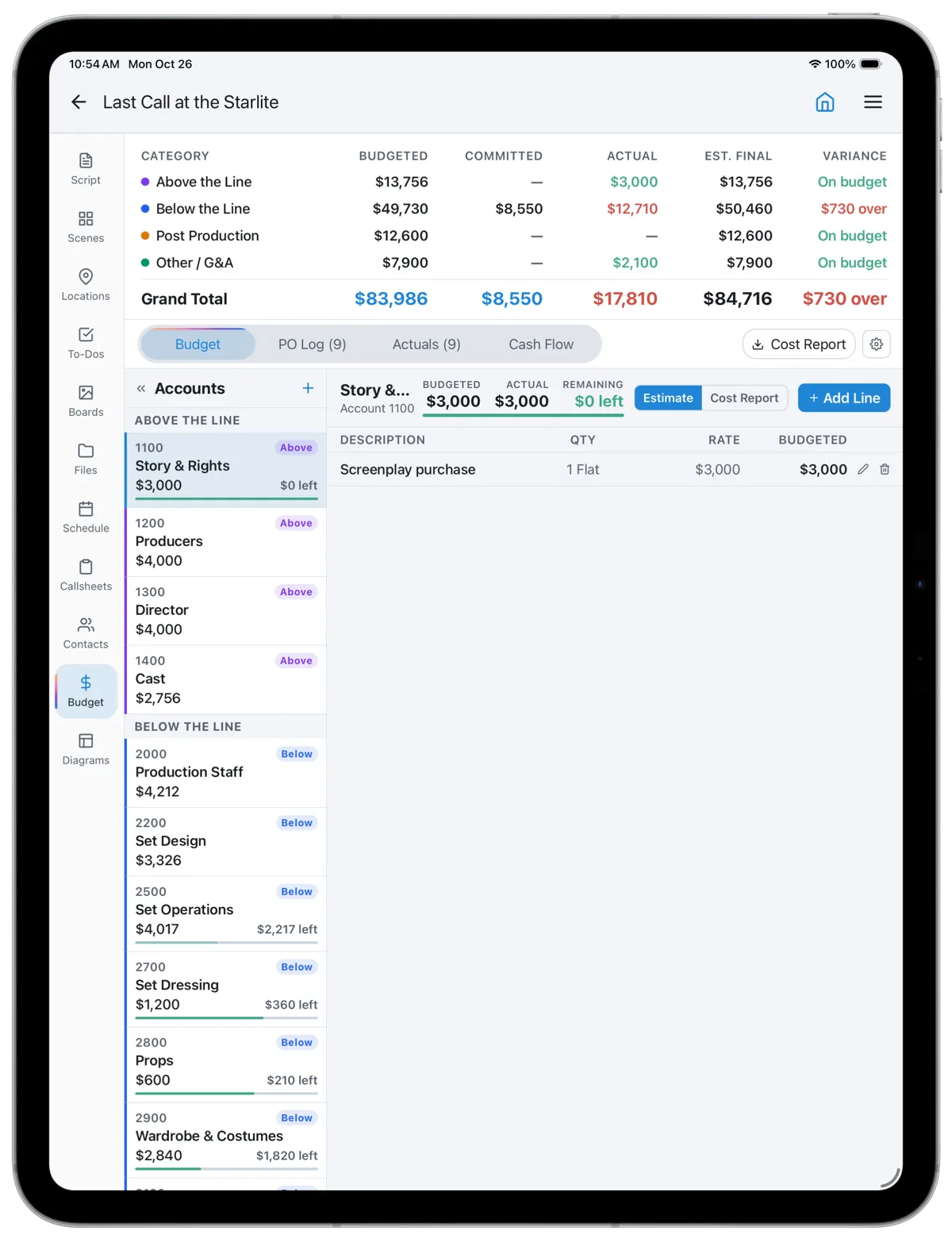
A new budget starts with 21 EP-numbered accounts across above the line, below the line, post and other, from Story & Rights to Contingency. Add line items by days, weeks, hours, flat or allowance, and the totals roll up by account and category as you type.
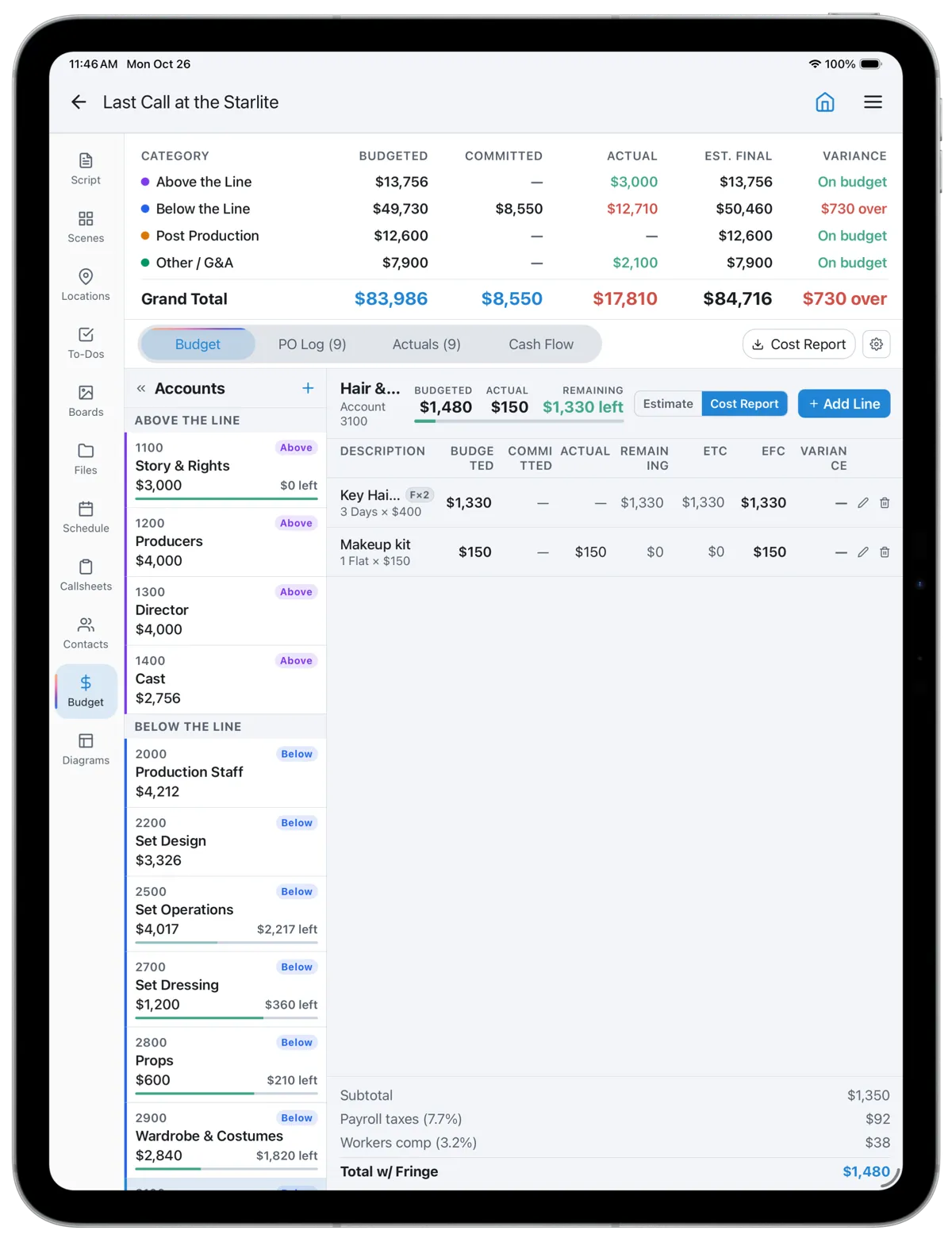
Labour lines take fringes. Load industry presets for FICA, Medicare, FUTA, state taxes, SAG-AFTRA, DGA and IATSE pension and health, and workers' comp, or set your own rates. The top sheet totals budgeted, committed, actual, estimated final and variance for the whole show.
Purchase orders
Every Commitment in One Log
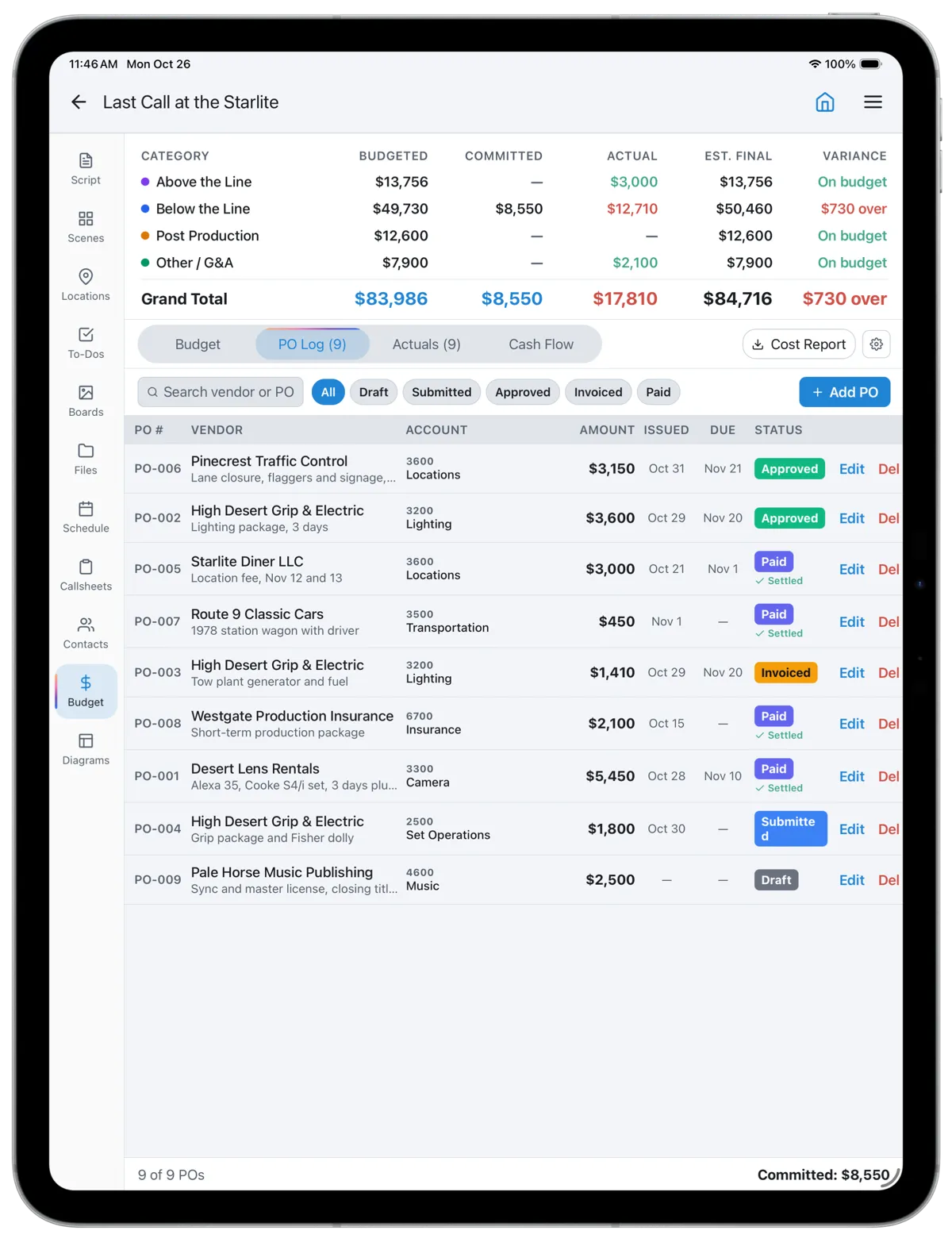
Raise a purchase order against an account or a single line, give it a vendor, an amount and a due date, and move it from draft to submitted, approved, invoiced and paid. Open POs count as committed money, so the budget shows what you have promised before the invoice arrives.
When the invoice comes in, log the actual cost against the PO and it stops counting as committed. Receipts without a PO go straight in as actuals.
Cost report
Variance on Every Line
Switch any account from Estimate to Cost Report and each line shows budgeted, committed, actual, remaining, estimate to complete, estimated final cost and variance. Set an estimate to complete where you know a line will run over or under, and the estimated final cost follows.
Lock the budget once it is approved and the original figures become the baseline, so later changes show as movement against what was signed off. Export the cost report as a PDF for the producer or the financier.
Committed before it's spent. Variance before it's a surprise.
Built for the Productions That Budget in a Spreadsheet
Most short films, music videos and small commercials are budgeted in a spreadsheet that is accurate on the day it is approved and wrong a week later, because nobody has time to reconcile it against the receipts. CineFlo keeps the budget beside the schedule and the call sheets, so the person logging a rental is already in the app where the shoot is planned.
A weekly cash flow shows when the money goes out, and the currency list covers USD, EUR, GBP, CAD, AUD and a dozen more, including INR, MXN, BRL, NGN and VND. The budget is part of the free plan, and the cost report PDF comes with CineFlo Pro.
The terms on this page are explained in the glossary: top sheet, above the line, fringes and purchase order.
Questions about budgeting?
FAQs
Common Questions About Film Budget Software
Is there free film budget software?
Yes. CineFlo's free plan includes a full production budget on one project, starting from 21 default accounts, with line items, 13 fringe presets, purchase orders, actuals and the cost report view. CineFlo Pro adds unlimited projects and the cost report PDF.
Is Movie Magic Budgeting free?
No. Movie Magic Budgeting is sold by Entertainment Partners as a paid subscription, and has no publicly advertised free trial. CineFlo's budget is included on its free plan.
What is a cost report in film production?
A cost report compares the approved budget with what the production has committed and spent, and estimates the final cost of each line. It shows the variance, how far each line is over or under, so the producer can move money before a problem becomes an overage.
What are fringes in a film budget?
Fringes are the payroll costs added on top of wages: employer taxes such as FICA and unemployment, workers' comp, and union pension and health contributions. CineFlo applies them per line from presets you can edit. See fringes in the glossary.
Can I track purchase orders and actual costs?
Yes. Purchase orders move from draft to paid and count as committed money while they are open. Actual costs can settle a PO or stand on their own, and both roll into the cost report.
Which currencies does the budget support?
USD, EUR, GBP, CAD, AUD, NZD, JPY, BRL, MXN, INR, IDR, PHP, VND, NGN, ZAR, AED, CZK, HUF and PLN, the same list on mobile and the web.