
Lighting diagram app
Lighting Diagrams Your Gaffer Can Light From
Draw the set from above with real Aputure, Godox and Astera fixtures at their published sizes. Show each light's beam and the camera's position, label every unit, and hand the gaffer a prep list with wattage, gel and power. The diagram lives in the same project as the shot list, the schedule and the call sheet, on iPhone, iPad, Mac, Android and the web.


Plan the setup
Draw the Room, Then Light It
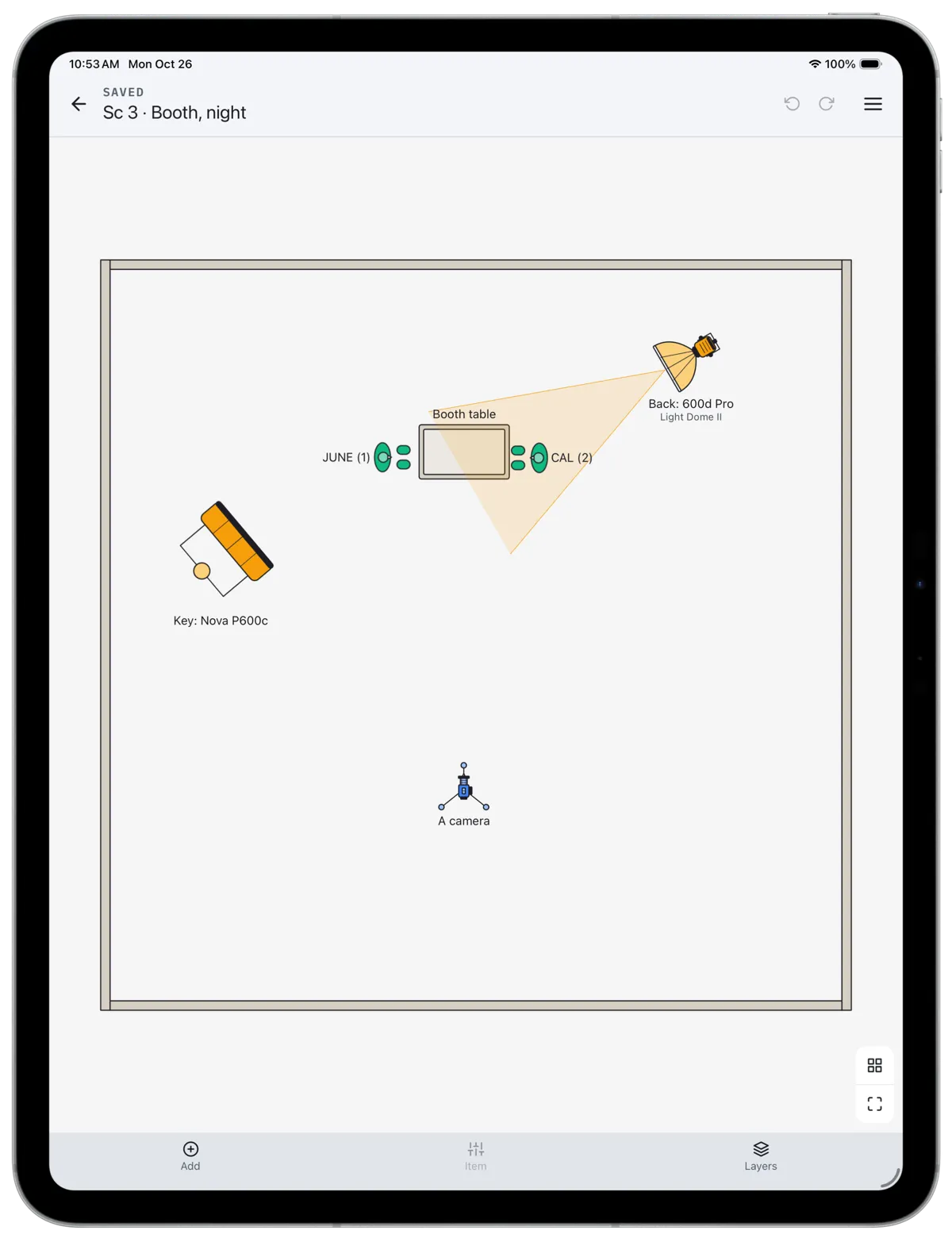
Start with a room at its real size, drop in the table, the actors and the camera, and place each light where it will stand. A 4 x 4 ft panel draws as a 4 x 4 ft panel, so what fits on paper fits on the floor.
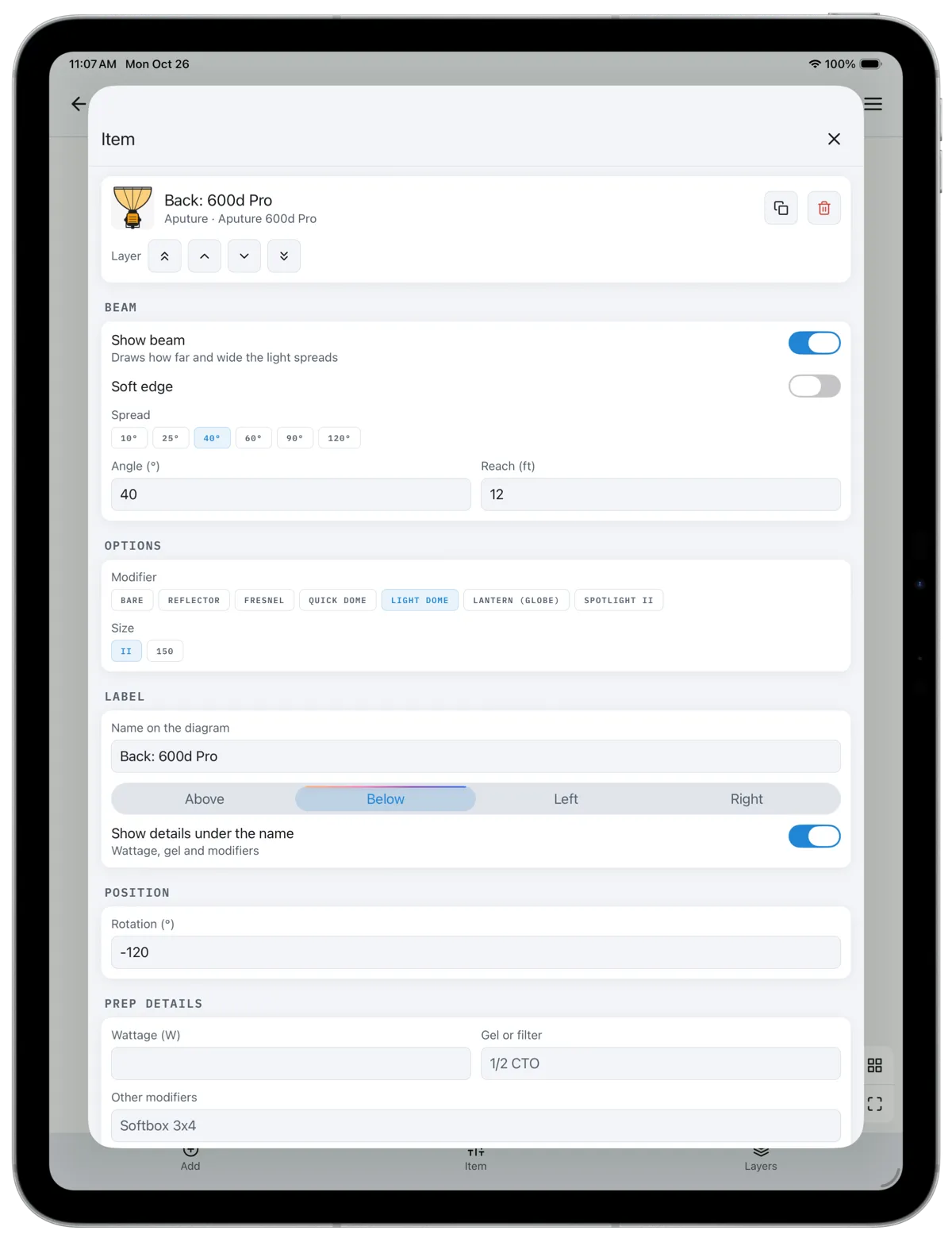
Turn on a light's beam to see where it lands. Pick a spread from 10° to 120°, set how far it reaches, and soften the edge. Cameras show their field of view the same way, so you can check that the backlight stays out of frame before anyone rigs it.
Brand fixtures
Real Lights, Real Modifiers
The fixture list carries the lights crews actually rent: Aputure's 300d, 600d, 1200d, STORM and Nova heads, Amaran panels and mats, Godox and Astera tubes. Each head takes the modifiers it really takes, from a Light Dome or a lantern to a Fresnel or a Spotlight attachment, and the modifier shows on the drawing.
Beyond the lights there are flags, frames, rags, stands, a telescopic crane with an arm you can pose, dollies and track, cable runs and arrows for actor and camera moves.
Drawn on the scout. Rigged from the prep list.
A Prep List for the Gaffer
Every light and grip item can carry its wattage, gel or filter, other modifiers, power source and notes. Those details print under each label on the drawing if you want them there, and they collect into a prep list: one line per unit, ready for the gaffer and best boy to load the truck from.
On CineFlo Pro the diagram exports as a PDF with the prep list on a second page, with your company logo on both. The free plan includes one diagram per project with every drawing tool, and you can open any diagram on the web as a sharp, zoomable drawing.
Where the Diagram Lives
A lighting diagram usually lives in a drawing app, a PDF in someone's email and a photo of a whiteboard. In CineFlo it sits in the project beside the shot list, the stripboard and the call sheet, so the DP plans coverage and light in the same place, and the crew finds the diagram where they already look.
It works offline on a phone or tablet, so you can change the plan on the scout or on the day, where it usually changes.
Questions about diagrams?
FAQs
Common Questions About Lighting Diagrams
Is there a free lighting diagram app?
Yes. CineFlo is free to download, and the free plan includes one diagram per project with every fixture and drawing tool. CineFlo Pro removes the limit and adds PDF export of the diagram and its prep list.
How do you make a lighting diagram for a film?
Draw the space from above at its real size, place the actors and the camera, then add each light where it will stand and point it at what it lights. Label every unit with its role, such as key, fill or back, and note wattage, gel and power so the gaffer can prep from it. In CineFlo, turn on each light's beam to check coverage and keep the backlight out of the camera's view. The full method is in how to make a lighting diagram.
What should a lighting diagram include?
The set walls and doors, furniture that matters to blocking, actor positions and moves, every camera with its direction, and every light with its fixture, modifier and role. Add flags, frames and cable runs where they affect the setup, and a prep list of wattage, gel and power for the electric department.
Which lights are in CineFlo's fixture list?
Generic fixtures such as Fresnels, open faces, PARs, HMIs, COBs with softboxes or lanterns, LED panels, Kino banks and tubes, plus brand fixtures from Aputure, Amaran, Godox and Astera drawn at their published sizes, each with the modifiers it takes.
Can I make a lighting diagram on iPad or iPhone?
Yes. CineFlo runs on iPhone, iPad, Mac and Android, and diagrams open on the web. Drag items to place them, twist two fingers to rotate one, and edit its details from the item panel. Changes sync across devices and work offline.
Can I export a lighting diagram as a PDF?
Yes, on CineFlo Pro. The PDF carries the drawing with its labels, beams and fields of view, and you can add the prep list on a second page or share it as its own PDF.