
Home / Guides / How to Make a Lighting Diagram
How to Make a Lighting Diagram
A lighting diagram is an overhead plan of a setup: the room drawn from above, where the actors stand, where the camera looks, and where every light, flag and cable goes. It is how the director of photography tells the gaffer and key grip what to rig before anyone is on set.
A good diagram is one the electric department can load a truck from. Most guides stop at drawing a key, a fill and a backlight around a stick figure. This one goes on to the parts that decide whether the rig goes up on time: control, power, cable and the prep list.
What a Lighting Diagram Is For
The diagram does three jobs. In prep it gets the DP and director to agree on the look in terms the crew can act on. Before the shoot it tells the gaffer and best boy what to order and pull, and the key grip what stands, frames and rigging to bring. On the day it lets the crew pre-rig the next setup while the current one is shooting, which is where most of a day's time is won or lost.
It also outlives the shoot. When a pickup day comes three weeks later, the diagram is the record of how the scene was lit.
What to Include
- The space: walls, doors, windows and anything fixed, drawn to scale with the measurements you took on the scout.
- Furniture and set pieces that affect blocking or where a stand can go.
- Actor marks, labelled by character, with arrows for their moves.
- Each camera position and the direction it faces, with its lens if you know it.
- Every light: its fixture, its modifier, its role in the setup and the direction it points.
- Grip control: flags, floppies, diffusion frames, bounce and negative fill.
- Practicals in the shot, such as lamps, signs and screens, since they are lights too.
- Power: where it comes from, and how cable runs to each unit.
- A title with the scene, the setup and the time of day.
Step 1: Draw the Space at Scale
Start with the room, and draw it to scale. A diagram that is roughly right will tell you a 4 x 4 ft panel fits behind the booth when it does not, and you find out at call time. Take the measurements on the scout: the room, the ceiling height, the windows and which way they face, and the distance from the nearest power.
Mark anything you cannot move or rig to. A load-bearing column, a drop ceiling that will not take a clamp or a window you are not allowed to cover all change the plan, and they are cheap to discover on paper.
Step 2: Place the Cast and the Camera
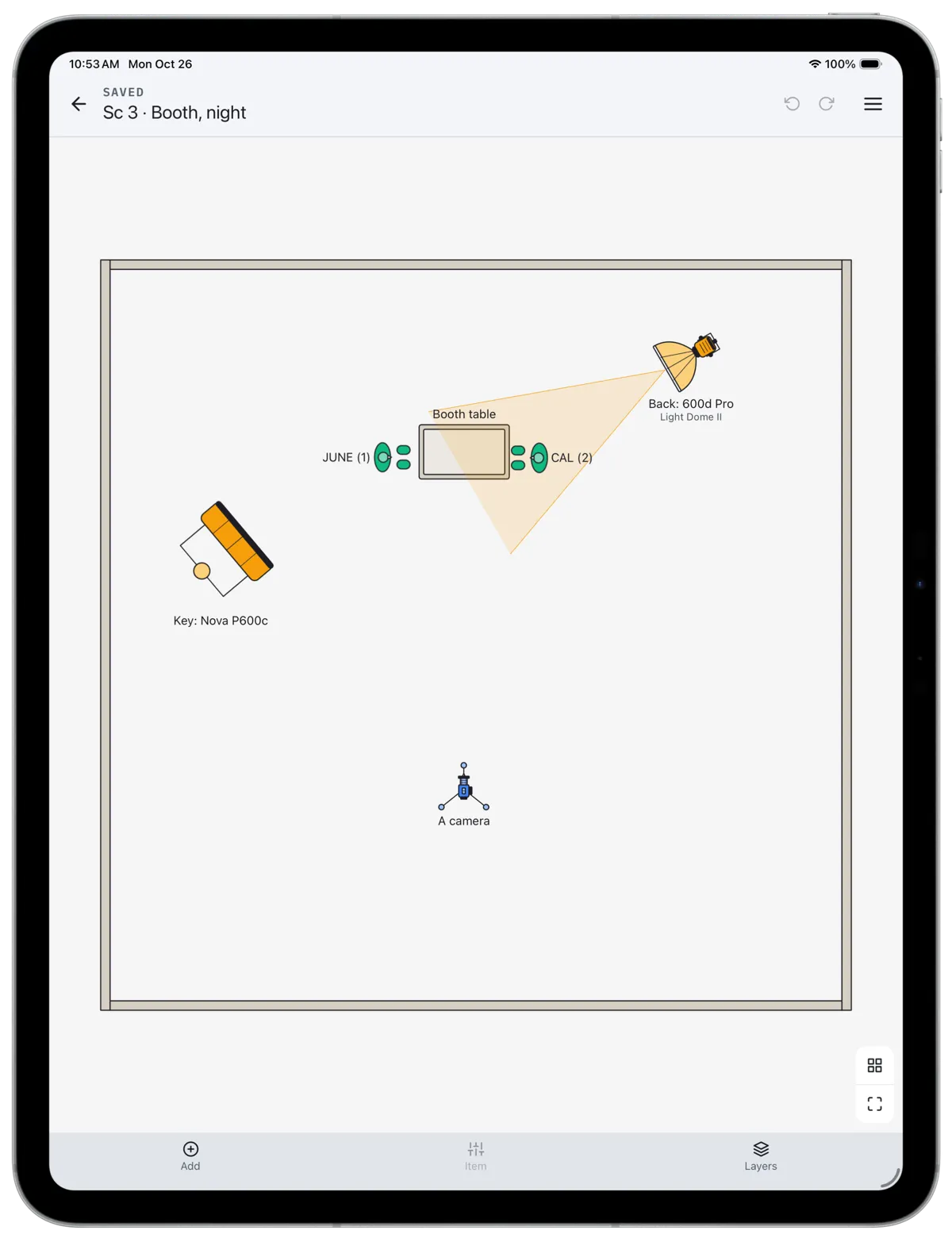
Lighting follows blocking, so place the actors before any light. Mark where each one starts and stops, and draw their moves as arrows. Then place the camera for the setup you are lighting, with an arrow or a cone for what it sees.
Think about coverage now rather than later. If the scene plays as a two-shot and then turns around for singles, the backlight for the first setup becomes a light in the shot for the reverse. Lighting a scene so it survives the turnaround, or deciding to relight, is the most useful decision a diagram helps you make.
Step 3: Place the Lights by Role
Place the key first, the light that defines the subject, and motivate it where you can: a window, a practical, a sign outside. Then add what the image needs and no more. That might be fill, a backlight or edge, light on the background, or a light to put an eye light in a lens-side close-up.
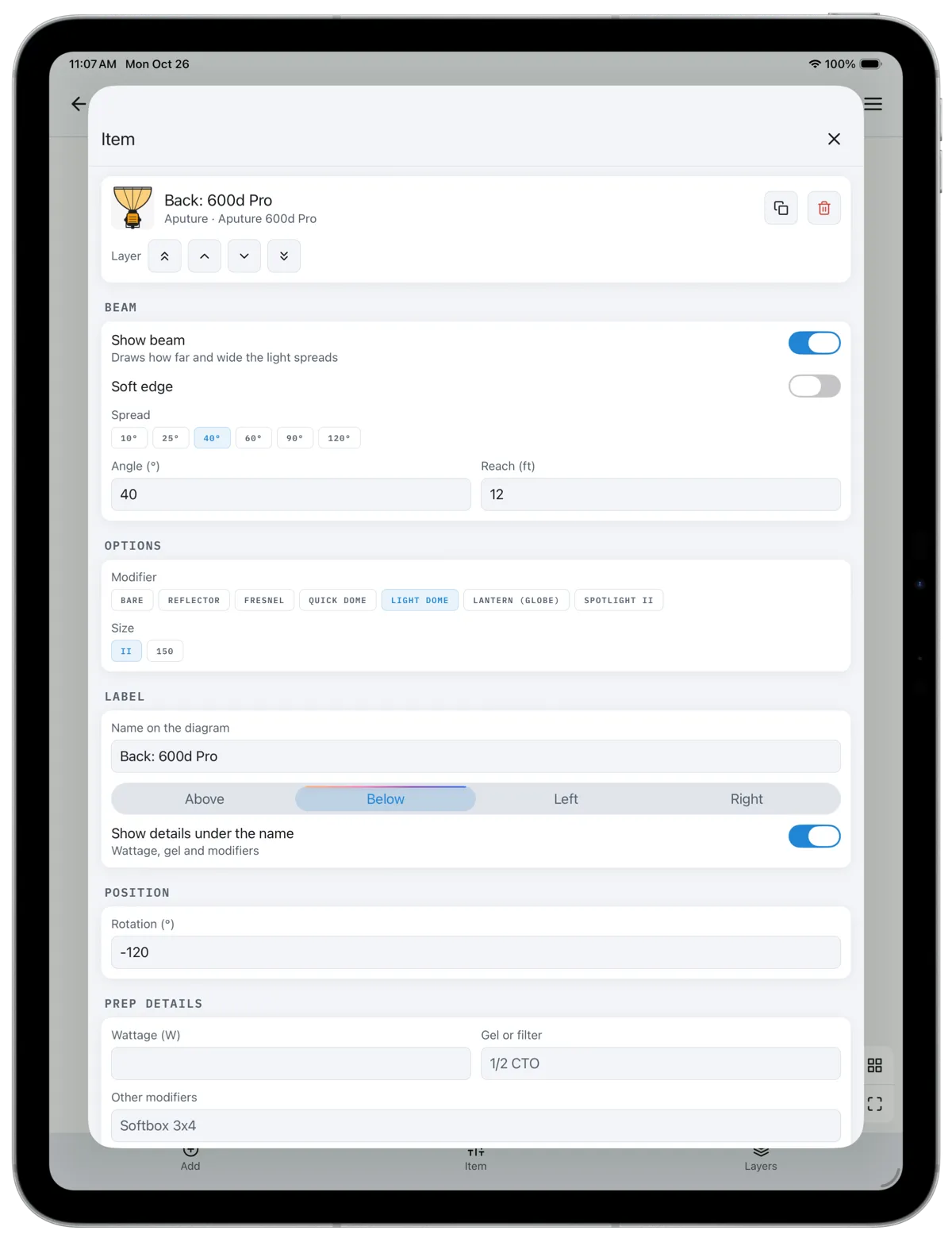
Label each unit with its role and its fixture, such as "Key: Nova P600c" or "Back: 600d, Light Dome". The role tells the crew why the light is there, which lets a gaffer make a sensible substitution when a fixture is unavailable. Draw each head pointing where it points. If your tool can show the beam, turn it on and check that each light lands where you think it does and stays out of the camera's view.
Note the color: the gel or the color temperature of each unit, and what you are balancing to. A warm tungsten practical against a daylight window is a decision, and it belongs on the diagram before the gels are pulled.
Step 4: Add the Control
Light is shaped as much by what blocks it as by what makes it. Add the flags that keep the key off the wall, the diffusion frame in front of the backlight, the bounce that fills from below and the negative fill that deepens a side of the face. A diagram with lights and no control tells the grip department nothing, and grip is often the bigger rig.
Step 5: Plan Power and Cable
Every light needs power, and the diagram is where you find out whether you have enough. Add the wattage of each unit on a circuit and divide by the voltage to get amps. A standard 120-volt, 20-amp household circuit should carry no more than about 16 amps continuously, which is roughly 1,900 watts. Two 600-watt heads on one wall outlet are fine; three are already over.
Mark where power comes from: wall circuits, a tie-in made by a licensed electrician, or a generator and where it is parked. Then draw the cable runs from the distro to each unit. Runs that cross a doorway, a dolly track or the actors' path need to be planned, ramped or flown, and they are much easier to move on paper than on the day.
Step 6: Turn It Into a Prep List
The last step is the one that makes the diagram useful to the crew: a list of every unit, one line each, with its wattage, gel and modifier, how it is powered, and any note such as "on a high roller" or "needs a speed rail". The electric and grip departments order and pull from this list, and it is how nothing gets left on the truck.
If you draw in CineFlo, each item in a diagram carries these details, and they collect into a prep list you can share as a PDF with the diagram.
One Diagram or Several?
Draw one diagram per setup that changes the rig, not one per scene. A scene that plays in a master and two singles from the same side can share a diagram. A scene that turns around, moves rooms or changes from day to night needs one for each. On a tight schedule, the order of the diagrams is also the order of the rigs, which tells the gaffer what to pre-light while the current setup shoots.
Common Mistakes
- Not drawing to scale, so a light or a stand that fits on the page does not fit in the room.
- Leaving out the camera, which makes it impossible to check what is in frame.
- Labelling fixtures without roles, so a substitution on the day changes the look.
- Forgetting practicals, which are in the shot and need dimming, gelling or swapping.
- Drawing lights and no control, so the grip department arrives without the flags and frames.
- Planning power last, after the plan already needs more than the location can supply.
Paper, Apps and Previs
Any of these will do the job, and the right one depends on how the diagram will be used. Paper and a pencil are the fastest way to plan on a scout. Free browser tools such as Blush draw quick, shareable diagrams with photometric beams and no account. Previs software such as set.a.light 3D and Cine Tracer simulates how the light will actually look in three dimensions, at the cost of time and a desktop computer.
A production app such as CineFlo is worth it when the diagram should live with the rest of the shoot: next to the shot list and the schedule, available offline on set, with a prep list the electric department can work from. The free plan includes one diagram per project.
Terms used here: golden hour, call time.
Frequently Asked Questions
How do you make a lighting diagram for a film?
Draw the space from above at its real size, place the actors and every camera position for the setup, then add each light where its stand will go and point it at what it lights. Label each unit by role and fixture, add flags, diffusion and negative fill, mark power and cable runs, and list wattage, gel and power for the electric department.
What should a lighting diagram include?
Walls, doors and windows; furniture that affects blocking; actor marks and moves; each camera with the direction it faces; every light with its fixture, modifier and role; grip control such as flags and frames; power sources and cable runs; and a title naming the scene and setup.
What is the difference between a lighting diagram and a lighting plot?
In film the terms are used interchangeably for an overhead plan of a setup. In theatre a lighting plot is a formal document for the whole rig, with circuit and channel numbers for every instrument; a film diagram usually covers one scene or setup and is redrawn as coverage changes.
Who makes the lighting diagram on a film set?
The director of photography designs the lighting and usually draws or approves the diagram. The gaffer often draws the working version, because they turn it into the electrical plan, and the key grip adds the rigging and control. On small crews the DP and gaffer are often the same person.
Is there a free lighting diagram app?
Yes, several. Blush is a free browser tool with no sign-in. CineFlo is free to download and includes one diagram per project on its free plan, inside the same project as the shot list and schedule. Paper and a pencil still work, and are faster than any app for a quick plan on a scout.
How do you calculate power for a lighting plan?
Add up the wattage of every unit on each circuit and divide by the voltage to get amps. On a standard 120-volt, 20-amp household circuit, keep the continuous load to about 16 amps, or roughly 1,900 watts. Anything beyond that needs another circuit, a tie-in by a licensed electrician, or a generator.
Key Takeaways
- A lighting diagram is for the crew who rig it, so draw what they need to order, pull and place.
- Draw the space at scale, then cast and camera, then lights by role, then control, then power.
- Label each light with its role as well as its fixture, so substitutions keep the look.
- Do the power arithmetic on paper: watts divided by volts gives amps, and a 20-amp household circuit carries about 1,900 watts.
- Finish with a prep list, one line per unit, because that is the document the truck is loaded from.