
Film mood board template
A Film Mood Board Template, With a Worked Example
A mood board for a film works best with a fixed set of sections, so the director, the DP and the designers are answering the same questions. Here is the structure we use, what belongs in each section, and a complete example from a short film, from the first board to the exported lookbook.


The Template
Start every film's board with these four sections, in this order. Add the others when the project needs them.
| Section | What goes in it | Ask yourself |
|---|---|---|
| Tone | A line that sums up the film's feeling, two or three images that carry it, and a note on pace | If someone saw only this section, would they know what the film feels like? |
| Palette | Color swatches with names, split by world if the film has more than one, such as interior night and exterior dawn | Could a designer buy paint and fabric from it? |
| Lighting | Reference stills for quality and direction of light, and a note on sources: practicals, windows, moonlight | Does the gaffer know what is motivating the light? |
| Camera | Framing and movement references, lens choices and how the camera behaves | Does the operator know when the camera moves and why? |
| Production design | Set and prop references, materials and textures | Add when sets are built or heavily dressed. |
| Wardrobe | Costume references and color per character | Add when costume carries story. |
| Location | A board per key location: the space, its light, its sound | Make one board per location rather than one section. |
| Character | A board per lead: look, posture, references | Make one board per character for casting and wardrobe. |
Keep each section to what a head of department would act on. Ten images that agree beat thirty that argue with each other.
Worked example
Last Call at the Starlite
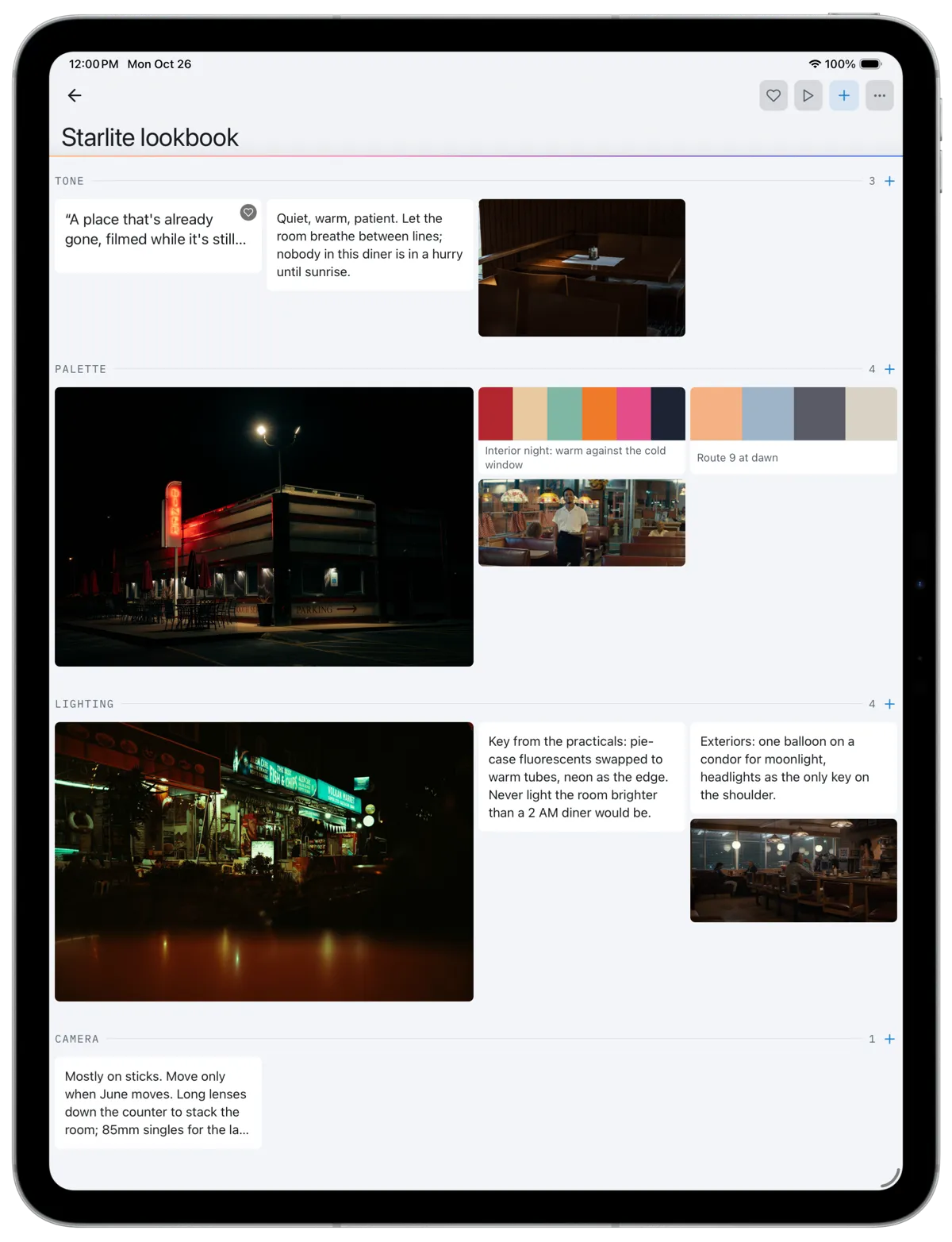
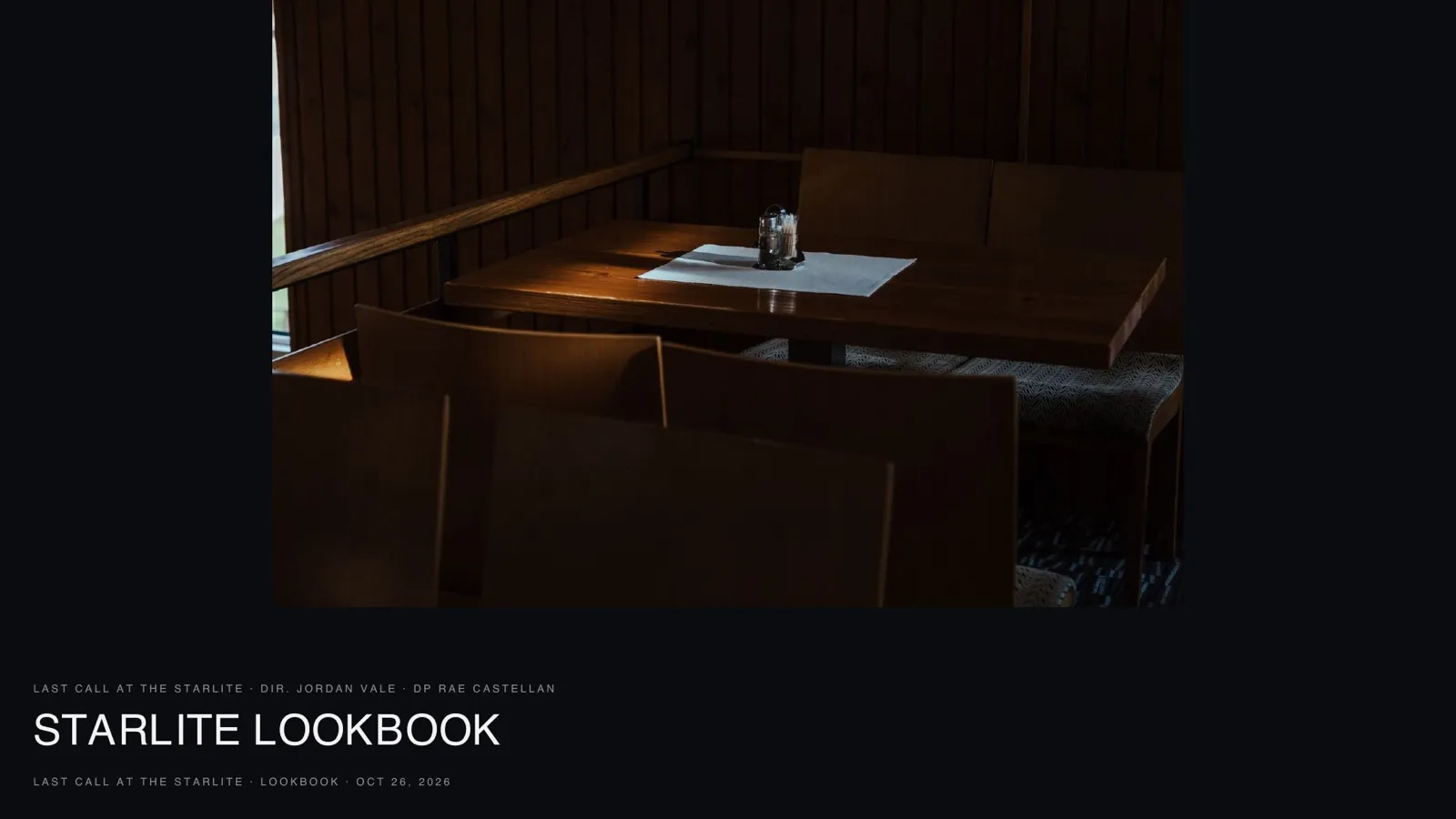
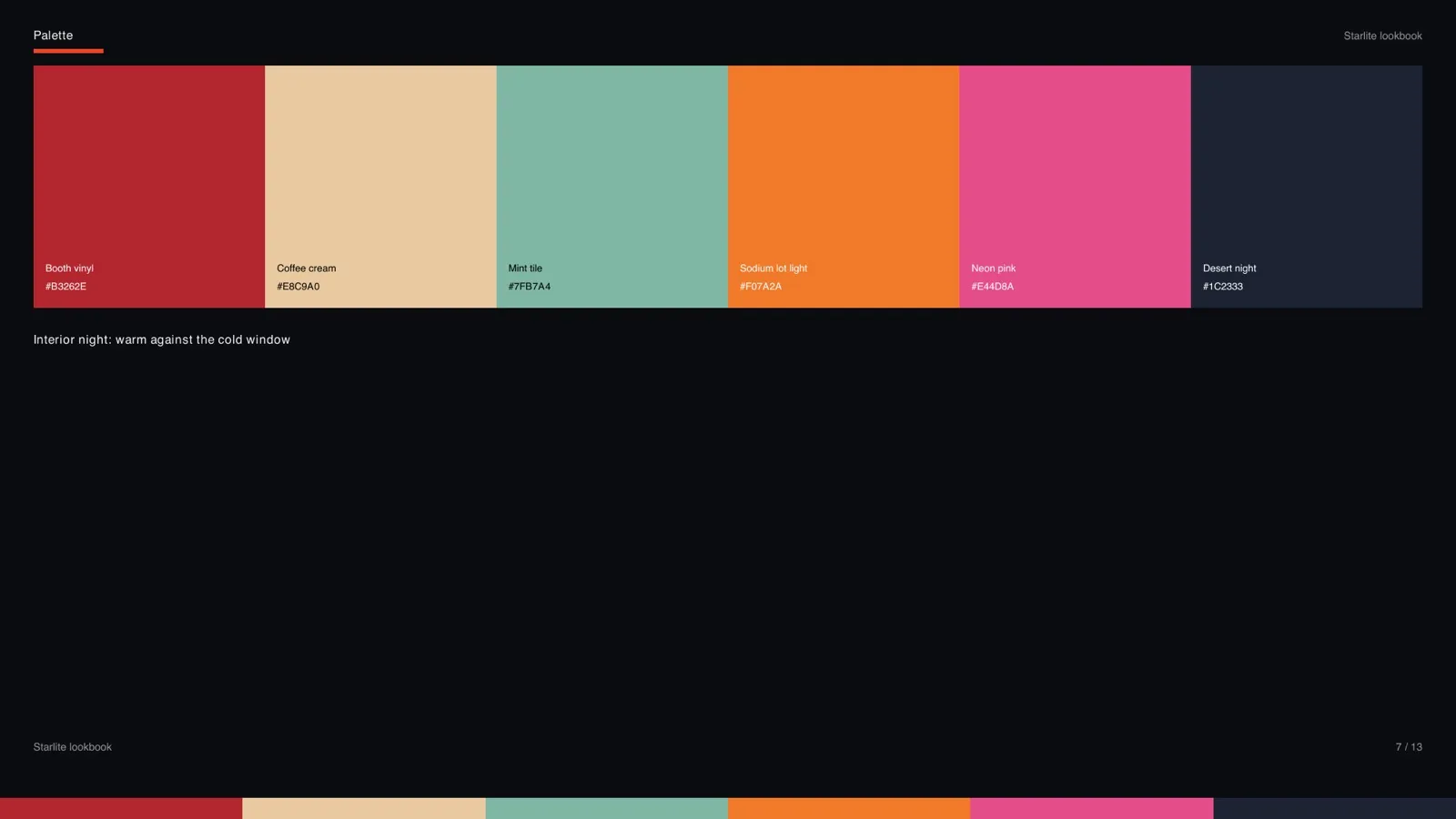
A short film about the last night of a roadside diner. The tone section opens with a single line, "A place that's already gone, filmed while it's still open," a note on pace, and one still of an empty booth. The palette splits the film into two worlds: a warm interior night of booth vinyl, coffee cream, mint tile, sodium orange and neon pink against a desert-night blue, and a cooler dawn of first light, pre-dawn blue, asphalt and dust.
Lighting carries two notes the gaffer can act on: key from the practicals with the fluorescents swapped to warm tubes and the neon as an edge, and on the exteriors one balloon light for moonlight with headlights as the only key. The camera section is one sentence: mostly on sticks, move only when June moves, long lenses down the counter, 85mm singles for the last scene.
From board to lookbook
What the Exported Lookbook Looks Like
A lookbook is the board edited down and laid out to be shown, to financiers, to cast, or to heads of department on the first day of prep. The Starlite board exports as a 13-page lookbook: a cover with the title, director and DP, a page for the tone line, one page per image, a page for each palette with its swatches named, the lighting and camera notes, and a sources page that credits every reference.
Image pages are the strongest pages in any lookbook, so give each reference room. One image a page reads as a decision; a grid of twelve reads as a search result.
Palette pages
Name Every Color
A swatch with a name is something a designer can match; a swatch without one is a guess. The Starlite palette names each color after where it lives in the film: booth vinyl, coffee cream, mint tile, sodium lot light. The exported page prints each name with its hex value, and the palette runs as a strip along the bottom of every page in that section.
How to Make a Lookbook for a Film
Collect broadly, then cut. Gather references in a mood board as the look develops, with a board for the film and separate boards for key locations and characters. When the board is settled, cut each section to the images that agree, write one sentence per section that says what the images mean, and name every palette color.
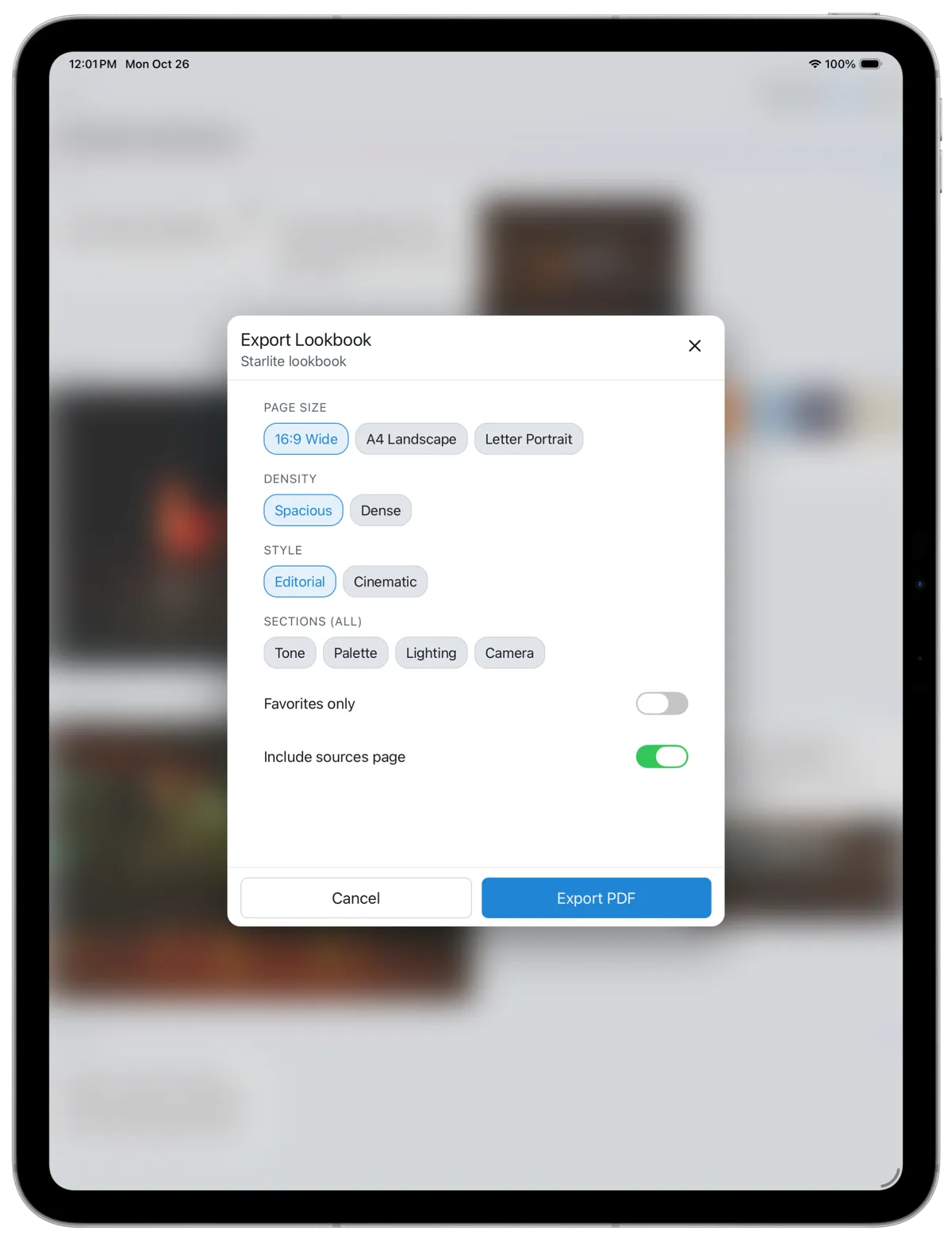
Choose the format for the audience. A 16:9 wide layout reads well on a screen in a pitch; A4 landscape or US Letter portrait prints for a production office. Credit your sources: if references come from stock libraries or other films, a sources page says where each came from.
In CineFlo a board holds images from your library, camera, Pexels or project media, plus notes, links and palettes, and you can present it full screen. On Pro it exports as a lookbook PDF in 16:9, A4 landscape or Letter portrait, in an editorial or cinematic style, spacious or dense, with any sections you choose, favorites only, and an optional sources page.
Export options
One Board, Several Lookbooks
The same board can make a spacious 16:9 pitch deck for financiers and a dense A4 print for the art department, or a lookbook of only your favorite cards for a casting session. Pick the sections that matter to that audience and leave the rest out.
See mood boards in CineFlo for how boards work for a location or a character, and the glossary entry for lookbook.
Questions about mood boards?
FAQs
Common Questions About Film Mood Boards
What should a film mood board include?
Start with tone, palette, lighting and camera. Add production design, wardrobe, location and character sections or boards when the project needs them. Each section should hold a few references that agree and one sentence saying what they mean.
What is the difference between a mood board and a lookbook?
A mood board is the working collection that grows as the look develops. A lookbook is that material edited down and laid out to be shown, usually as a PDF, to financiers, cast or heads of department.
How do you make a lookbook for a film?
Collect references on a mood board, cut each section to the images that agree, write one line per section, name every palette color, then lay it out for the audience: 16:9 for a pitch on screen, A4 or Letter to print. Credit your sources on a final page.
How many pages should a film lookbook be?
Usually 10 to 25 pages for a short or a pitch. The Starlite example is 13 pages: a cover, a tone page, one page per reference image, a page per palette, the lighting and camera notes and a sources page.
Is there a free mood board app for filmmakers?
Yes. CineFlo's free plan includes one mood board per project with images, notes, links and palettes, and full-screen present mode. CineFlo Pro adds unlimited boards and lookbook PDF export.
Can I use images from other films in a mood board?
For an internal mood board, references from other films are common practice. Before a lookbook is shown publicly or sold, check the rights to each image, and use a sources page so everyone knows where each reference came from.